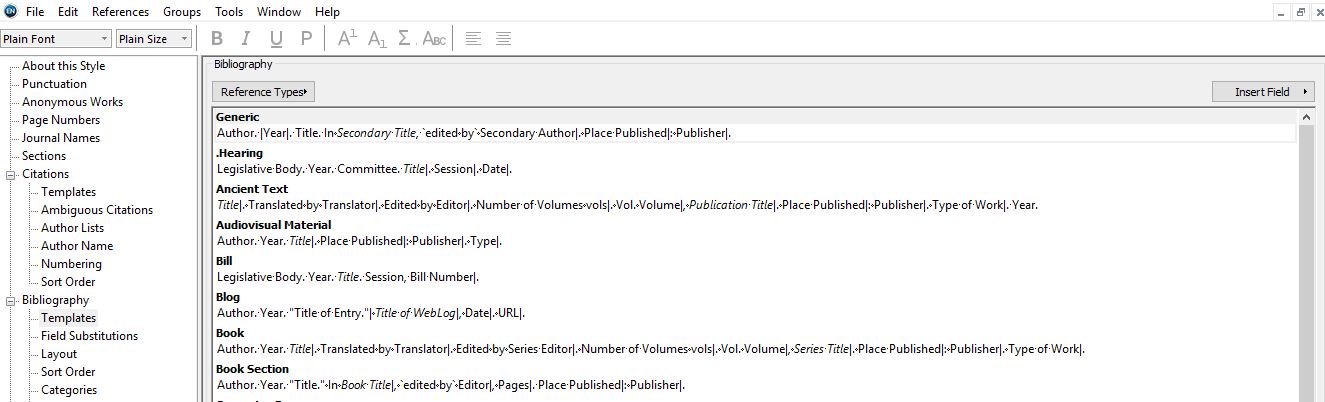
I am currently setting up a reference style for a group that is about to publish a book togheter. I want to make some tweaks in a few of the reference styles, but my vision gets distracted by seeing all the styles that we never use in the window for “templates”.
There is a list of styles in a drop down menue for the templates and it is fine to select the ones that are not selected, but it is not possible to unselec any of them. Seems to me like a glitch. By the way - I am working on paralells on a mac (windows 7) Endnote 7.3.1. I also tried to fix this via endnote x6 on the mac side…
please advise
@landgena wrote:
…There is a list of styles in a drop down menue for the templates and it is fine to select the ones that are not selected, but it is not possible to unselec any of them…
Are you referring to an output style’s pull - down menu list of bibliography reference templates (see attached image)? Templates on the list that appear with an adjacent check mark indicate a pre-existing template already in use - so if you wish to make any changes you need to do so within that template. Or if you don’t need the template, then delete it and it should appear on the pull-down menu list without a check mark (indicating it’s not in use).
I encountered exactly the same problem in X8 on Windows. Unable to uncheck any unwanted reference type on Bibliography>Template. Please help!
Thank you Leanne for your advice and directing to the help menu which I obviously overlooked. I googled and some of the instructions provide the same solution.
However, this method failed. The attached file shows that it only adds a period in the actual name (see “hearing”). I suspect it might due to a different kind of period? I need to deal with a few languages and some of them are not Latin script based. But if this method just doesn’t work then I should find other solutions instead of trying hundred types of periods.
Also, does this method works if I want to hide sections when I am editing references? Take “hearing” as an example again, if I do not want to see DOI when I am editing a reference, can I use a similar method to hide it? (I actually tried but it comes to show “.DOI” instead of hiding it.
Thanks again in advance and happy EndNoting!
Problem solved, thank you! Simply deleting texts from the bibliography template and save it then all things done. The panel (for me) is much cleaner now.