Im using the latest version of EndNote on WIndows 7 Ultimate, word 2013, reference style J Public Admin Res Theory. WHY is it sooooo difficult to insert pages numbers?? I cant find how to do it. I need page numbers for certain citations in certain places, but there does not seem to be a sensible way to do it. Please help
im sorry, but could you describe the process of adding pages in the suffix step by step. when i right click i choose Edit Citations, then More?
i dont understand what suffix means and where to put the cited pages in it. when i right click on a citaiton and choose more a new windows pops up where i can’t see any “suffix”, can you please clarify where to find the mysterious suffix? )
thank you, i am amazed how i managed not to see these fields before …
This is still such a cumbersome system, with too many steps for good work flow.
How come there is no option to add pages when you are adding the original citation using the “insert citation” action? Surely having an option there, when you select the reference, to add page numbers would not be too difficult? Having to insert the citation, wait for the whole VBA field process to finish its updating, then right clicking on the recently added field, selecting ‘edit citations’, finding the citation you wish to add the page numbers too (if you have many references in that group), then adding the page numbers, then updating it again (setting the VBA processing going all over again) is a burdensomely ineffecient way of doing something so simple.
When working on lengthy documents (e.g. PhD theses of books), or extensively researched documents, the ludicrously inefficient work flow decreases productivity to a significant degree. You could skip all that pain if adding page numbers was coded into the same window as adding citations.
This is still such a cumbersome system, with too many steps for good work flow.
How come there is no option to add pages when you are adding the original citation using the “insert citation” action? Surely having an option there, when you select the reference, to add page numbers would not be too difficult? Having to insert the citation, wait for the whole VBA field process to finish its updating, then right clicking on the recently added field, selecting ‘edit citations’, finding the citation you wish to add the page numbers too (if you have many references in that group), then adding the page numbers, then updating it again (setting the VBA processing going all over again) is a burdensomely ineffecient way of doing something so simple.
When working on lengthy documents (e.g. PhD theses of books), or extensively researched documents, the ludicrously inefficient work flow decreases productivity to a significant degree. You could skip all that pain if adding page numbers was coded into the same window as adding citations.
Game changer! Cheers Leanne - this sounds right up my alley.
I’m still using X5, to turn of CWYW, do I deselect the “Enable Instant Formatting on new Word documents” option? A
The clunkiness of waiting for all the flashy updating each time you add a reference has been driving me nuts for years. Have a 75 page chapter at the moment, that is comparatively light on references, and it is just torture. I’d much rather manually type the references and then manually update in one fell swoop when I am walking away from the computer for a bit.
Would multiple refs look something like: {Gounaris, 2007 #53@89; Coldstream, 2003 #77@306; Vink, 1997 #82@126; Weiberg, 2016 #4493@67}?
(mind you - still don’t understand why they can’t have page numbers in the insert citation window, OR the option to stay in that window and keep adding references when you are citing multiples - which for me is all 300 footnotes so far!)
Hmm, weirdness: Just tried that manual citation (also, unchecking that box didn’t turn off auto–update - would love to know where I can do that?), and got this result:
Vink 1997: 126; : 306; Gounaris 2007: 89; Weiberg 2016: 67.
Any idea why Coldstream went awol? He’s in the list when you rightclick on it and go to edit citations (also in the page number seen above), but no idea why the reference isn’t showing?
Apologies for the triple posting (I can’t work out how to edit original posts here), but I found the solution to the question of turning off instant formatting (clicking on the corner arrow to open the bibliography tool tab in word, then going to the formatting tab).
Now it is just the weirdness about the missing reference: I’ve added another 30 manually since the last post, and it is doing this to several, always selectively too (the other references either side will be happy and complete). Coldstream in particular disappears consistently?
Yup, page numbers is an option - but only once you open the full window (see attached)
Coldstream is a book, and a quick scan showed that the other missing ones also seem to be books. I can’t see any books that worked, but I admit I haven’t gone through every single citation (document too large)
I checked the template (in Chicago 16thA, using the footnotes - attached the style) and all seems good there re field coding, so not sure why the Au and Year is missing for the books?
There’s also small anomalies that make no sense in the bibliography too, like a full stop not appearing after an author’s name, or the first parenthesis in front of (ed) missing. Again, the template seemed fine? But maybe I am too ignorant on what it should look like
Thanks for all your help!
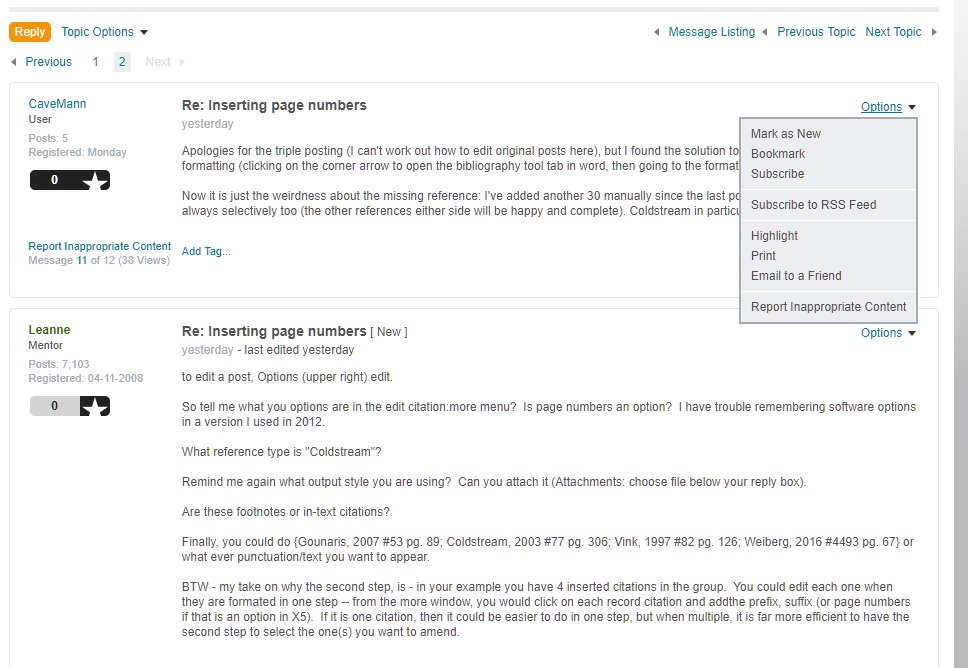
PS On a side note, “edit” isn’t an option for me in the options drop-down menu of the forum post here? (Screenshot attached)

Chicago 16th A KTH_copy.ens (67.7 KB)
I seem to have fixed “it” by telling Chicago to use the same format as citations for footnotes. No idea still what “it” was, but seems to be working correctly now.
Cheers for the help!
No worries - I also can edit posts now too.
Again, no idea what the problem was (perhaps I just needed to sign out and in again?), but I do love it when things somehow sort themselves out (although a part of me is forever left screaming “but why!?” in a little corner of my mind)
thanks for all your help
- Thank you. I was struggling with the same problem and this has helped.