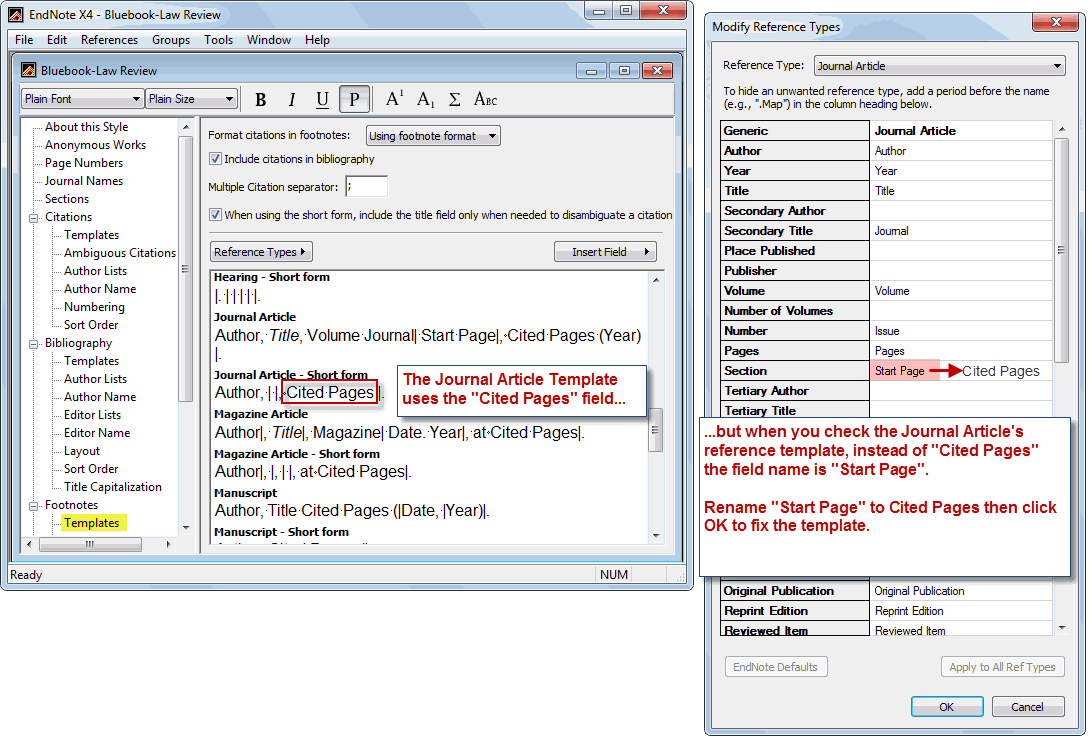
To illustrate the mismatch in field names between the Bluebook-Law Review output style and the EndNote reference template (Journal Article), refer to the attached image.
-
When you view the Bluebook-Law Review output style, the footnote template shows the field “Cited Pages” is used within the Journal Article and other templates. [Go to the EndNote toolbar, select EDIT, OUTPUT STYLES, EDIT Bluebook-Law Review. Then within the style’s pop-up box, locate “Footnotes” then click “Templates”.]
-
However, the Journal Article’s reference template shows the fields “Start Pages” and “Pages” (not Cited Pages) is used in the template. [Go to the EndNote toolbar, select PREFERENCES, then in the Preferences pop-up window click “Reference Types”, then “Modify Reference Types”. Locate and view the Journal Article reference type.]
-
Rename the “Pages” or “Start Pages” field to “Cited Pages”. Then click the OK button. Repeat steps #2 and 3 to fix other reference templates as needed (e.g., Book, Book Section.)